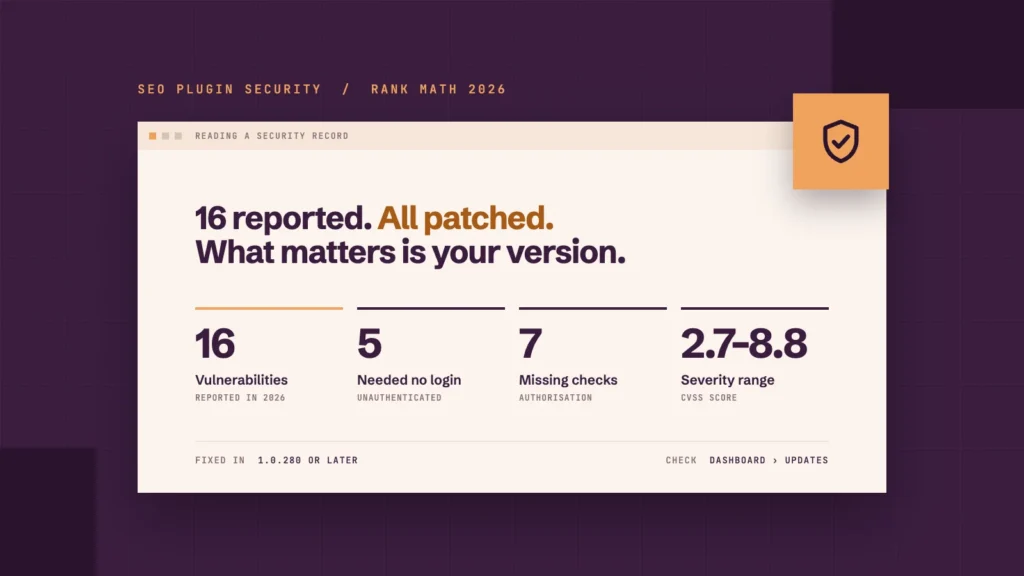
Security researchers reported 16 vulnerabilities in 2026 in Rank Math, one of the most widely used SEO plugins for WordPress. Search Engine Journal says that's more than any other SEO plugin has had this year. We use Rank Math on our own website and on client websites, so the story landed close to home.
Sixteen vulnerabilities sound alarming. On its own, though, the number tells you very little about whether the plugin on your site is safe today. This guide covers why SEO plugins in general deserve particular attention, how to read a plugin's security record, and what a flaw can do to your search visibility as well as your website.
Quick answer
An SEO plugin isn't a security risk just because vulnerabilities have been reported in it. The risk depends on whether your site runs a patched version, who can log in, and whether anyone notices when settings change. To keep that risk low, update the plugin promptly, give users only the access they need and switch off unused features. Then check your SEO settings after any significant change.
On this page
Why are SEO plugins a bigger target?
Does a high vulnerability count mean a plugin is unsafe?
How do you judge an SEO plugin's security record?
Can an SEO plugin vulnerability hurt your rankings?
Who has access to your SEO settings?
How can you reduce what your SEO plugin exposes?
Why are SEO plugins a bigger target than most plugins?
An SEO plugin reaches further into your website than most add-ons. A slider or form plugin only affects the pages it appears on. An SEO plugin usually runs on every page and controls what search engines read in each page's code: the title, meta description, canonical tag, indexing instructions and schema. Many also manage your XML sitemap, redirects and 404 monitoring.
That reach is what makes them useful, and it's also why a flaw matters. Rank Math has more than 4 million active installations, according to WordPress.org, so one weakness can expose a lot of websites at once. SEO plugins also put editing panels in front of everyone who writes content. People with limited logins use that plugin code every time they edit a post.
Does a high vulnerability count mean a plugin is unsafe?
Not by itself. A count tells you how many problems were found and disclosed in a given timeframe, such as a year. It doesn't tell you how many still affect your site. Once a fix is released and installed, a disclosed vulnerability no longer applies to that website. All 16 of Rank Math's 2026 vulnerabilities are listed as patched, and version 1.0.280 or later includes every fix.
Popular plugins also attract more attention from security researchers, and more attention finds more bugs. Search Engine Journal notes that AI is making vulnerability disclosures more common in general, but it also points out that other SEO plugins haven't had anywhere near as many. For comparison, it reports that Wordfence recorded four vulnerabilities in the free version of Yoast SEO in 2026 and two in the paid version.
The count still isn't meaningless. Seven of Rank Math's 16 issues involved missing authorisation checks, and the rest covered a wide range of weakness types. In our view, a plugin's record over several years, and how quickly it fixes problems, tells you more than one year's total.
How do you judge an SEO plugin's security record?
Judge it on how serious each vulnerability was, who could exploit it and how quickly it was fixed, not on how many were reported. These five checks cover it:
What to check
Why it matters
Where to find it
Severity score
Each vulnerability gets a CVSS score out of 10. Rank Math's 2026 issues ranged from 2.7 (low) to 8.8 (high).
Wordfence or Patchstack vulnerability databases
Access needed
Some flaws can be used by anyone. Others need a login at a particular role.
The vulnerability title, e.g. "Authenticated (Author+)"
Patch status
Tells you whether a fixed version exists and which version to update to
The database entry's "Patched" and "Remediation" fields
How quickly fixes arrive
A short gap between disclosure and patch suggests the plugin is actively maintained
The plugin's changelog on WordPress.org
Repeat patterns
The same type of flaw appearing again and again can point to a deeper problem
The plugin's full vulnerability history
Who can use a vulnerability matters as much as how serious it is. Five of Rank Math's 2026 vulnerabilities could be used without logging in. The two most serious, both remote code execution flaws rated 8.8, needed a Contributor or Author account. A high-severity flaw is less of a threat if only people you trust hold accounts at that level. A medium-severity flaw that needs no login is open to anyone.
Can an SEO plugin vulnerability hurt your rankings?
Yes. Most coverage of plugin vulnerabilities focuses on hacking, but some flaws in SEO plugins can damage your search visibility without anyone taking over your site. Rank Math's 2026 issues included unauthenticated changes to homepage settings, unauthenticated deletion of SEO data, and Authors overwriting metadata they shouldn't be able to touch. One issue exposed the content of password-protected posts because the plugin generated SEO metadata from that content without checking the password first.
Any of these could change what Google sees without changing how your pages look to visitors. Updating stops a flaw being used, but it doesn't undo changes made before the update. That's why it's worth knowing what to check. Focus on the settings the SEO plugin itself controls:
Meta titles and descriptions on your most important pages
Indexing settings, both site-wide and on individual pages, so nothing has been set to noindex by mistake
Your XML sitemap, to confirm it loads and lists the pages you expect
Your redirects list, looking for entries nobody on your team added
Schema output on key pages, using Google's Rich Results Test
Google Search Console, where a sudden rise in pages "Excluded by noindex tag" in the Page indexing report is an early warning sign
Plugin updates and website changes can occasionally affect SEO settings, so we check these things after any significant change. If the change is bigger, such as a redesign, our guide to website migration SEO covers the wider checks.
Who has access to your SEO settings?
Several of Rank Math's 2026 flaws could only be used by someone logged in as a Contributor or Author. Under the standard WordPress user roles, a Contributor can write posts but not publish them, and an Author can publish their own. These roles often go to freelance writers or temporary staff, and they're easy to forget once the work is done. If one of those accounts is still active, anyone who gets hold of its password could use a flaw like this.
We recommend three habits:
Give people only the access they need. A content writer rarely needs to be an Administrator.
Keep Administrator accounts to a minimum.
Review user accounts regularly and remove any that are no longer needed, such as a past employee or a freelancer who finished their project.
Rank Math also has a Role Manager that controls which user roles can change its settings. It's worth checking who can edit SEO settings on your site, not just who can log in.
How can you reduce what your SEO plugin exposes?
An easy way to reduce what your SEO plugin can expose is to switch off the features you don't use. Rank Math is built in modules, and Rank Math's module guide shows you how to disable the ones you don't need from Rank Math SEO → Dashboard → Modules. Less active functionality means less code running on your site.
This is good practice, but it doesn't guarantee protection. A flaw in a module you rely on still affects you, so updating remains the biggest line of defence. Check what your site actually depends on before switching anything off, too. A module that looks unused may be handling your redirects, your schema or something else important on your website.
How does Nivo Digital manage SEO plugin security?
We use Rank Math because it covers what our clients need from an SEO plugin: meta titles and descriptions, XML sitemaps, schema markup and other technical SEO settings. Vulnerabilities aren't unique to Rank Math, and the number reported in a year doesn't mean the latest version is insecure. Our current approach is to keep using it and keep it updated, and we'd look at switching if there was an ongoing security concern or a better alternative.
Here's how we keep on top of it:
Monthly maintenance. Our maintenance includes WordPress core, plugin and theme updates every month.
Monitoring. Our Website Manager follows Feedly and industry news for security issues. That's how we picked up this Rank Math story.
Security reviews. When a security issue is reported, we review it and check whether it affects the websites we look after. We check compatibility before updating and test the website afterwards.
Our post on the latest WordPress security alert explains why it's important to stay informed about vulnerabilities and keep your website's software up to date.
Should you stop using a plugin after vulnerabilities are reported?
Usually not. A list of reported vulnerabilities is a reason to check how a plugin is maintained, not an automatic reason to remove it. Switching SEO plugins brings its own risks, as titles, redirects and schema all need moving across without anything going missing. What protects your website is keeping the plugin updated, limiting who can log in, switching off what you don't use, and having someone check your site after significant changes.
Want someone keeping an eye on your plugins?
Our WordPress maintenance covers monthly WordPress, plugin and theme updates, with the website tested afterwards. Talk to us about looking after your website.
FAQs
Is Rank Math safe to use?
Rank Math is as safe as the version your site runs. Sixteen vulnerabilities were reported in 2026, all of which have since been fixed, and updating to the latest version is how you get the fixes. We still use Rank Math on our own website and on client websites, and we keep it updated.
Is Yoast SEO safer than Rank Math?
Fewer vulnerabilities were reported in Yoast SEO in 2026: Wordfence recorded four in the free version and two in the paid version, one of which was also rated 8.8. A lower count doesn't automatically make a plugin safer, though. Switching plugins also means moving all your SEO data across, which carries its own risk.
Can a plugin vulnerability affect my Google rankings?
Yes, if it lets someone change your SEO settings. Some of Rank Math's 2026 flaws allowed SEO data to be deleted or homepage settings to be changed without a login. Check your indexing settings, sitemap, redirects and the Page indexing report in Google Search Console if you're concerned.
How do I find out if my SEO plugin has a vulnerability?
Vulnerability databases such as Wordfence and Patchstack publish details of reported issues, including the affected and patched versions. Your WordPress dashboard shows when a plugin update is available. The plugin's changelog on WordPress.org lists what each update fixed.
Should I turn off Rank Math modules I don't use?
It's good practice, as it reduces the functionality running on your site. It doesn't guarantee protection, so you still need to keep the plugin updated. Check what each module does before switching it off, because some handle redirects or schema.
What WordPress role should a content writer have?
Usually Contributor or Author, depending on whether they need to publish posts themselves. Contributors can write but not publish, and Authors can publish their own posts. Writers rarely need Administrator access, and their accounts should be removed when they no longer need them.