On 3 November 2026, the US Cybersecurity and Infrastructure Security Agency (CISA) confirmed that attackers are exploiting a flaw in WordPress core. It gave US federal agencies until 6 November 2026 to fix it. If your business website runs on WordPress, the same fix applies to you, wherever you are.
This alert has an unusual twist. The flaw can only be exploited while a site is updating, so how and when updates happen matters as much as whether they happen at all. Below, we explain what the vulnerability is, how to check whether your site is affected, why critical security releases shouldn't wait for your next scheduled update, and why updates are only one part of keeping a site secure.
Quick answer
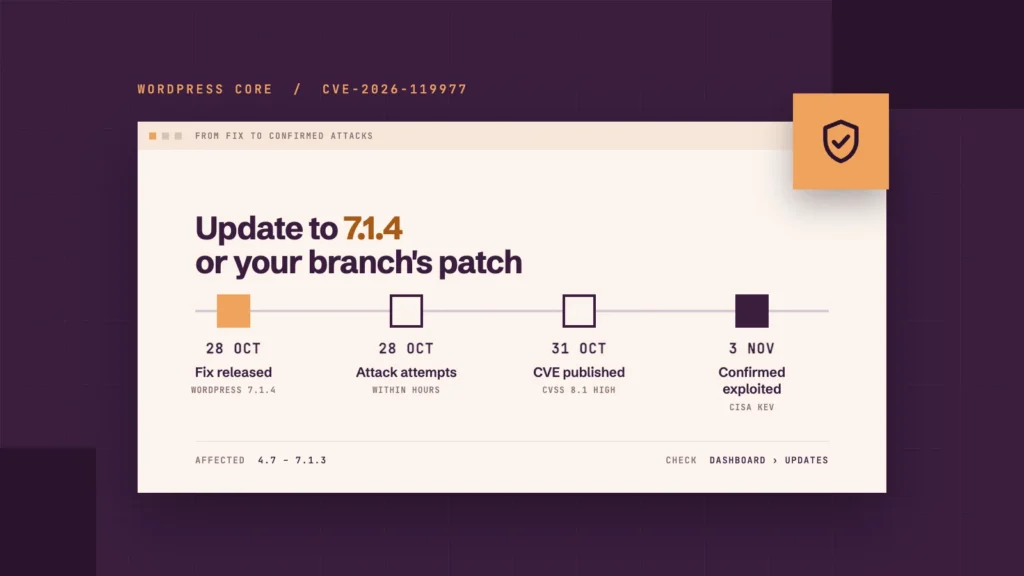
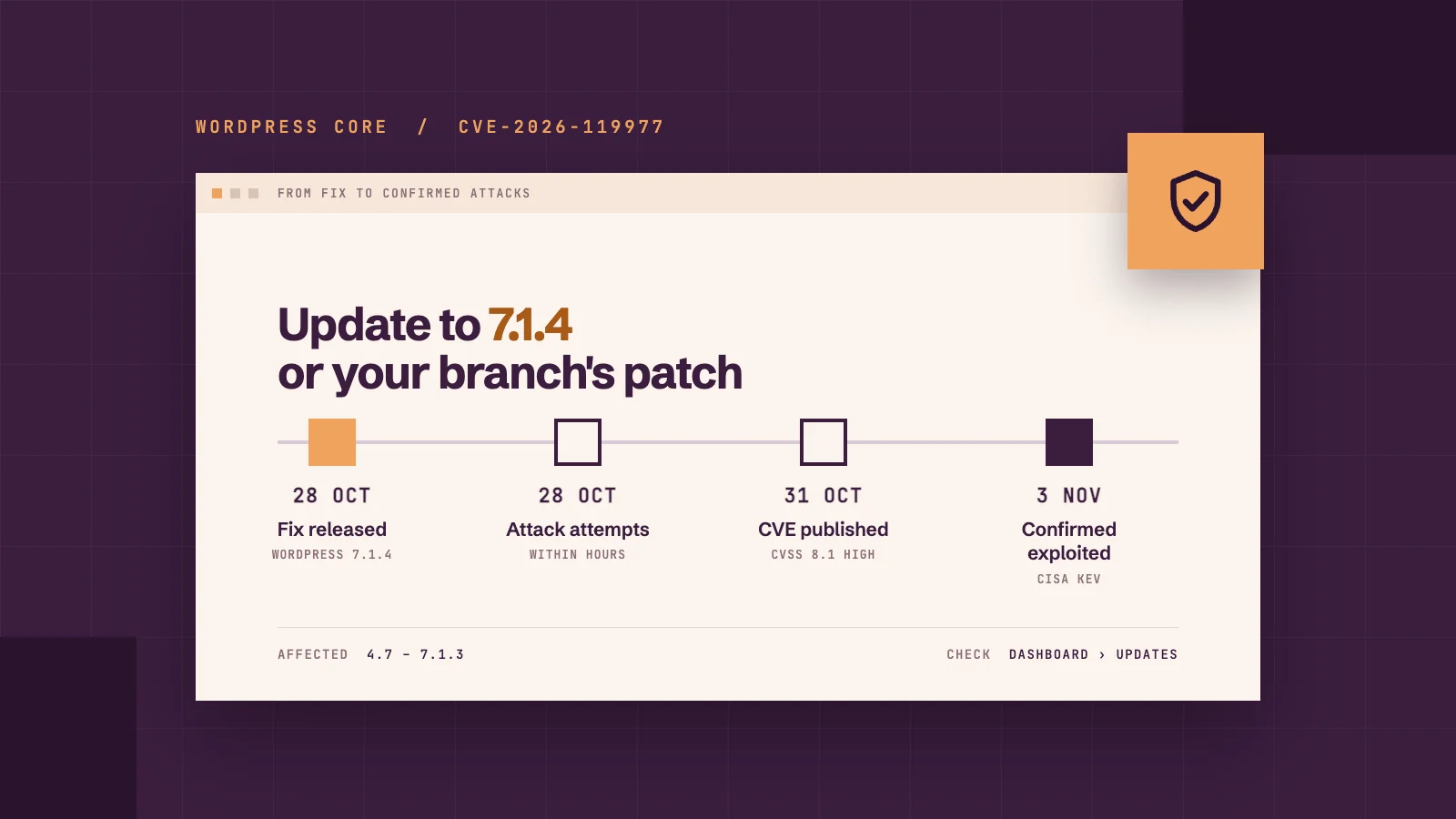
CVE-2026-119977 is a flaw in WordPress core that affects versions 4.7 to 7.1.3. During a full core update, it can let an attacker with no login run code on your server, if they reach the site in a window that usually lasts only seconds. Wordfence rates it high severity, and CISA has confirmed it is being actively exploited. Update to WordPress 7.1.4, or the patched release for your version, as soon as possible, then check the update has completed.
On this page
What is the WordPress security alert about?
Is the vulnerability being actively exploited?
Why does a WordPress security alert matter for service businesses?
How do you check your WordPress version?
Is it safe to update WordPress right now?
Why are updates only part of WordPress security?
What should you do if you think your site was attacked?
How can you keep your website protected without watching the news?
What is the WordPress security alert about?
The alert concerns CVE-2026-119977, a vulnerability in the way WordPress core updates itself. When WordPress installs a full core update, it briefly unpacks a complete copy of itself, including its installer, into a temporary folder with a predictable name. On many servers, that folder can be reached from the web. For those few seconds, an attacker who knows where to look can reach that copy and use it to run their own code on your server.
Two things make this serious. An attacker doesn't need a login, and nobody on your side has to click anything. Wordfence, the security company that assigned the flaw its CVE number, gives it a CVSS score of 8.1 out of 10, which counts as high severity. WordPress's own advisory rates it low, because the attack has to land in such a short window. Attackers have responded by checking sites over and over, hoping to catch an update in progress. If one succeeds, they could take control of your website and the data stored on it.
The flaw was reported to WordPress by security researcher Umut Bayram of Picus Security. The WordPress team fixed it in version 7.1.4, released on 28 October 2026 alongside fixes for 21 other security issues. As a courtesy, the fixes were also backported to every older version branch still eligible for security fixes, going back to version 4.7.
Is the vulnerability being actively exploited?
Yes. On 3 November 2026, CISA added CVE-2026-119977 to its Known Exploited Vulnerabilities catalogue, a list of flaws with evidence of real attacks. It ordered US federal agencies to fix it by 6 November.
That deadline only binds US government agencies, but CISA encourages all organisations to prioritise fixing the flaws on its list. In the UK, NHS England's cyber security team issued an alert about the update and assesses further exploitation as likely. Attackers moved quickly: Wordfence recorded attack attempts within hours of the fix being released, with automated tools checking sites again and again, so a site doesn't need to be well known to be targeted.
The scale is already visible. BleepingComputer reported that Wordfence, a WordPress security firm, blocked 13,095 attacks targeting this vulnerability in a single 24-hour period at the start of November. Those are attempts that were stopped rather than successful break-ins, but they show how widely attackers are looking.
Why does a WordPress security alert matter for service businesses?
If you run a service business, your website probably handles more personal data than you'd expect. Every enquiry, quote request and booking is personal information about a real customer, and WordPress often keeps a copy.
Depending on how your site is set up, it may store:
contact and enquiry form entries, with names, email addresses, phone numbers and details of what each person needs
quote and booking requests, which can include home or business addresses
job applications and CVs, if you advertise vacancies on your site
user accounts for you, your staff and anyone else who can log in
newsletter sign-ups, if subscribers are stored on the site
Because this flaw lets an attacker run their own code on your server, anything stored on the site could be within their reach. They could also change your pages, add malicious code or use your site to send spam, all of which can damage the trust your customers place in you.
What does GDPR say about website security?
If your website collects personal data, UK GDPR makes you responsible for keeping it secure. Article 32 requires "appropriate technical and organisational measures", and the Information Commissioner's Office (ICO) treats patching as part of that.
In August 2026, it reprimanded ACRO Criminal Records Office after attackers compromised its website, most likely through an unpatched vulnerability. The content management system behind the site had gone more than three years without its security fixes, partly because nobody was clearly responsible for spotting when updates were needed. Its antivirus software also flagged the attackers' tools, but nobody acted on the alerts.
If a personal data breach is likely to put people at risk, you must report it to the ICO without undue delay and, where feasible, within 72 hours of becoming aware of it. The ICO also has a breach response checklist for small businesses to help you check you're prepared.
We're not lawyers, and this isn't legal advice. But keeping your website updated is one of the most practical steps you can take to protect your customers' data.
How do you check your WordPress version?
Log in to your WordPress dashboard and go to Dashboard > Updates. The page shows the version you're running and whether a newer one is available. You'll also see the version in the "At a Glance" panel on the main dashboard screen.
Your site is protected from this flaw if it runs 7.1.4 or the patched release for its version branch:
If your site runs
Update to at least
7.1.0 to 7.1.3
7.1.4
7.0.x
7.0.8
6.9.x
6.9.11
6.8.x
6.8.12
6.7.x
6.7.11
6.6.x
6.6.11
6.5.x
6.5.14
6.4.x
6.4.14
6.3.x
6.3.14
6.2.x
6.2.15
4.7 to 6.1
The latest security release for that branch
WordPress lists the patched release for every older branch, back to 4.7.39. WordPress 4.6 and earlier no longer receive security updates at all, so a site on one of those needs upgrading to a supported version. WordPress only actively supports the latest release, so 7.1.4 is the safest target either way.
Is it safe to update WordPress right now?
Yes, and updating is the fix. The risk sits in the few seconds while an unpatched version installs a full update, not in updating itself. Leaving your site on an affected version is the bigger risk, because every future full core update would open the same window.
We'd suggest working through it in this order:
Take a full backup of your files and database, so you have a recovery option if anything goes wrong.
Apply the security update for your version, then check Dashboard > Updates to confirm it's installed. If your site updates automatically, check that the update actually completed.
Update plugins and themes too, so you're not closing one gap and leaving others open, then check your key pages and forms still work.
Check your other sites. Old staging copies, development sites and forgotten microsites run WordPress too, and they're easy to miss.
Patchstack, a WordPress security company, also recommends blocking web access to the wp-content/upgrade folder, which closes the window the attack relies on, including during the update itself. That's a server-level change, so ask your hosting provider or developer rather than attempting it yourself.
Don't rely on a security plugin alone here. The attack goes straight to the temporary files without loading WordPress, so a plugin's firewall may not see it unless it's set up to run before WordPress loads. It's a useful extra layer, not a replacement for the update.
Why are updates only part of WordPress security?
This alert shows the limit of a fixed update schedule. WordPress released the fix on 28 October, attackers started probing within hours, and CISA confirmed real attacks six days later. WordPress installs security releases like this one automatically by default, but where automatic updates are switched off and updates only happen once a month, a site could have spent most of that month exposed.
In our view, scheduled updates are a good baseline, but critical security releases should be applied as soon as possible after they're released.
WordPress core is also only one layer. Most of the WordPress security risks a business site faces sit in the layers around it:
Plugins and themes each have their own code and their own vulnerabilities, and outdated ones are a common way in.
PHP, the language WordPress runs on, needs updating too. October's critical PHP security release fixed flaws underneath WordPress itself, where no WordPress setting could help.
Backups decide how quickly you recover if something does go wrong. They're only useful if they run regularly and are stored away from the site.
Monitoring tells you when something has changed that shouldn't have.
None of these replaces the others. A fully updated site with no backups is still one bad day away from a rebuild.
What should you do if you think your site was attacked?
Keep an eye out for suspicious activity, particularly if your site was running an affected version after the fix was released. Common warning signs include:
admin users you don't recognise
plugins, files or pages you didn't add
visitors being redirected to unfamiliar websites
browser or search engine warnings about your site
a sudden slowdown, or your host flagging unusual activity
If you notice any of these, or you're simply not sure whether your site is affected, contact your hosting provider or website maintenance team. They can check the server logs for requests to files in the wp-content/upgrade folder, which is where this attack lands. Resist the urge to delete things or restore an old backup straight away. A careful check first helps make sure the problem is fully removed, not just hidden.
If customer data may have been accessed, remember the ICO's 72-hour reporting window and note when you first became aware of the problem.
How can you keep your website protected without watching the news?
This won't be the last WordPress security alert, and the sites that come through them best are the ones where someone acts quickly. Check your WordPress version today, apply the security update if you haven't already, and make sure your backups are working.
If you'd rather not keep track of security news yourself, that's what Nivo Digital's WordPress maintenance is for. Every month, we update WordPress core, plugins and themes on the sites we look after, then test the site afterwards, with daily backups in place so there's always a recent recovery point. If a security alert worries you between scheduled updates, get in touch and we'll talk you through where your site stands.
FAQs
Does this WordPress security alert affect sites built with Elementor?
Yes, if the site runs an affected version of WordPress. The flaw is in WordPress core, not in any page builder, so it applies regardless of how your pages were built. Updating WordPress core fixes it, and Elementor itself needs no separate fix for this issue. If your site is built with Elementor, our Elementor maintenance keeps WordPress, Elementor and your other plugins updated together.
Should I update WordPress if my site is working fine?
Yes. A site can look and work perfectly while running a vulnerable version, and this flaw gives no visible sign until it's used. Back up first, then apply the security update.
Will automatic updates protect my site from this vulnerability?
They should, but check. WordPress installs minor security releases like 7.1.4 automatically by default, but hosts, plugins or developers can switch this off, and an automatic update can fail. Check Dashboard > Updates to confirm which version your site is running now.
What other WordPress vulnerabilities have there been in 2026?
This is one of several serious WordPress-related security issues this year. In July, WordPress 7.0.2 fixed a critical flaw in WordPress core, and attackers began exploiting unpatched sites within days. In October, a critical flaw in PHP, the language WordPress runs on, needed fixing at the server level. We covered it, and what it means for older PHP versions, in our post on PHP 8.2 end of life.
What if my site runs a very old version of WordPress?
WordPress 4.6 and earlier no longer receive any security updates. If your site is on one of these, it needs upgrading to a supported version. With a jump that large, we'd recommend a full backup and a test on a staging copy first, as older themes and plugins may not be compatible.
Is my site safe once it's on WordPress 7.1.4?
It's protected from this vulnerability. Your site's overall security still depends on keeping plugins, themes and PHP updated, taking regular backups and monitoring for anything unusual.