When the PHP security alert landed last week, the first thing our web developer did was get in touch with 20i, one of the hosting providers we use. 20i confirmed that the relevant security fixes had already been applied across its hosting platform. That's the easy version of this story.
The harder one starts on 31 December 2026, when PHP 8.2 stops getting official security fixes altogether. If your WordPress site runs on it, the next alert like October's won't come with an official fix. For a small service business, your website is often where new work starts, through an enquiry form or a booking request, and a hacked or broken site can quietly stop that work coming in. This guide covers what changes on 31 December, how to check which PHP version your site runs, who should be patching it and what to sort out before the end of the year.
Quick answer
PHP 8.2 reaches end of life on 31 December 2026, when the PHP project stops releasing security fixes for it. Before then, check which PHP version your site runs, ask your hosting provider to confirm October's critical PHP security fixes are in place and plan a tested move to a newer version, ideally PHP 8.4 or 8.5, with PHP 8.3 as the minimum.
On this page
When does PHP 8.2 reach end of life?
What happened in the critical PHP security release?
Is my WordPress website affected?
Who is responsible for updating PHP on my website?
How do I check which PHP version my website uses?
What should a small business do before 31 December?
When does PHP 8.2 reach end of life?
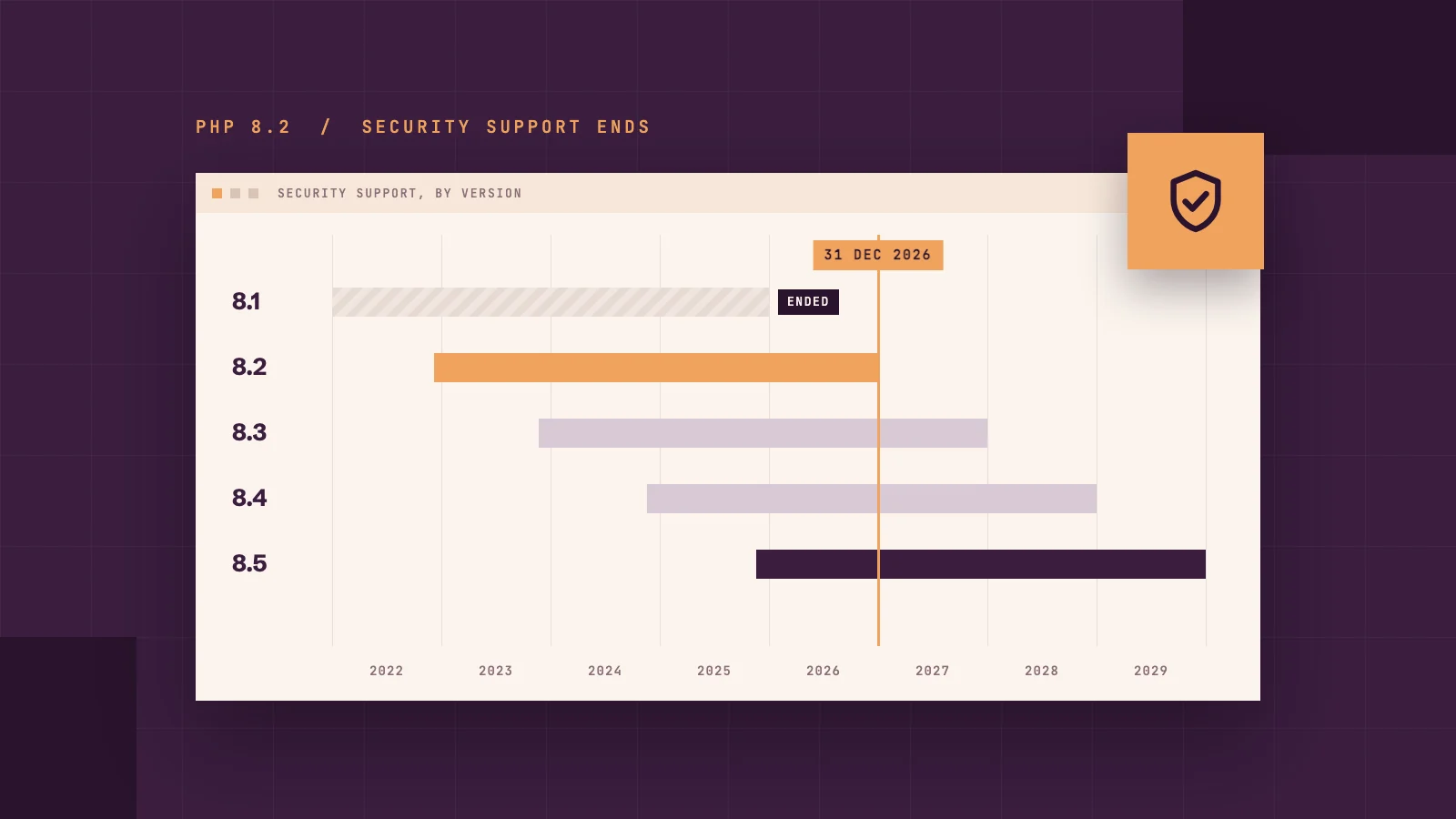
On 31 December 2026. That's the date the PHP project has set for the last security fixes for version 8.2, so any flaws found after 31 December won't get an official fix if your website stays on that version.
PHP versions don't last forever. Each one gets two years of full support, then two years of security fixes only before it's retired. Here's where each current version stands, according to the official PHP supported versions page:
PHP version
Security fixes until
What it means for you
8.1 and older
Security fixes untilAlready ended (8.1 on 31 December 2025)
What it means for youUpgrade now
8.2
Security fixes until31 December 2026
What it means for youPlan your move before January
8.3
Security fixes until31 December 2027
What it means for youSecurity fixes only since January 2026, so treat it as the minimum
8.4
Security fixes until31 December 2028
What it means for youFull support until the end of 2026, then security fixes only
8.5
Security fixes until31 December 2029
What it means for youThe newest, with full support until the end of 2027
The good news is that end of life doesn't mean your website stops working. It will carry on as normal on 1 January. The catch is that if another flaw like October's is found, PHP 8.2 won't get an official fix, and unless your host applies one itself, your website stays exposed until it's moved to a newer version.
What happens after 31 December?
What happens next really depends on who hosts your website. Looking at how different hosting providers have handled PHP 8.2 and October's fixes, three patterns stand out:
Your host upgrades you automatically. Some hosting providers retire old PHP versions on their own schedule. Acquia, for example, said it would move every remaining PHP 8.2 website to 8.4 on 1 October 2026, three months before the deadline. This means your site stays on a supported version, but if no one has tested your theme and plugins on the newer version first, parts of your website could stop working overnight.
Your host keeps patching the old version themselves. Some hosts take the fixes PHP releases for supported versions and apply them to older versions on their own servers, which is known as backporting. In October, CloudLinux, whose PHP builds are used by many shared hosting providers, released fixes for versions as old as PHP 5.2, and cPanel did the same for PHP 8.1, 8.0 and 7.4 in its own software packages. It's a useful safety net, but it's down to each host, and there's no promise it will happen every time. Because the version number often doesn't change, you'd need to ask your host to know it's been done.
Nothing happens at all. If your website is on a virtual private server (VPS) or your own server, where you manage the server software yourself, PHP stays on the same version until someone upgrades it. Your site keeps running as normal, but any new security flaws are left open unless you manually upgrade yourself.
Official support and your host's own fixes aren't the same thing. Official support means the PHP project itself releases fixes for that version. A backported fix is one your hosting provider (or the company that supplies its server software) applies to a version the PHP project no longer supports. Backports can keep an older version patched for a while, but you have to rely on your host to provide them.
Whichever of these applies to you, the websites that come through without problems are the ones where someone has tested a newer PHP version and planned the switch in advance. The risk lies with websites where nobody is keeping an eye on the date.
What happened in the critical PHP security release?
PHP is the programming language that sits on the web server behind WordPress, Elementor and most other content management systems. Each time someone visits a page on your site, PHP puts that page together before it appears in their browser. You never see it, which is exactly why it's easy to forget about.
On 20 October 2026, news of two critical flaws in PHP, known as CVE-2026-109618 and CVE-2026-109619 and nicknamed "PHP2Shell", leaked online before the planned fix was ready. Both were rated 9.2 out of 10 for severity because they could let an attacker run their own code on an unpatched server without needing a password.
In simple terms, this meant that someone could take control of the server your website sits on. From there, they could change or take down your website, add hidden code that sends your visitors to scam sites, or get hold of data stored on the server, such as the enquiries people send through your forms.
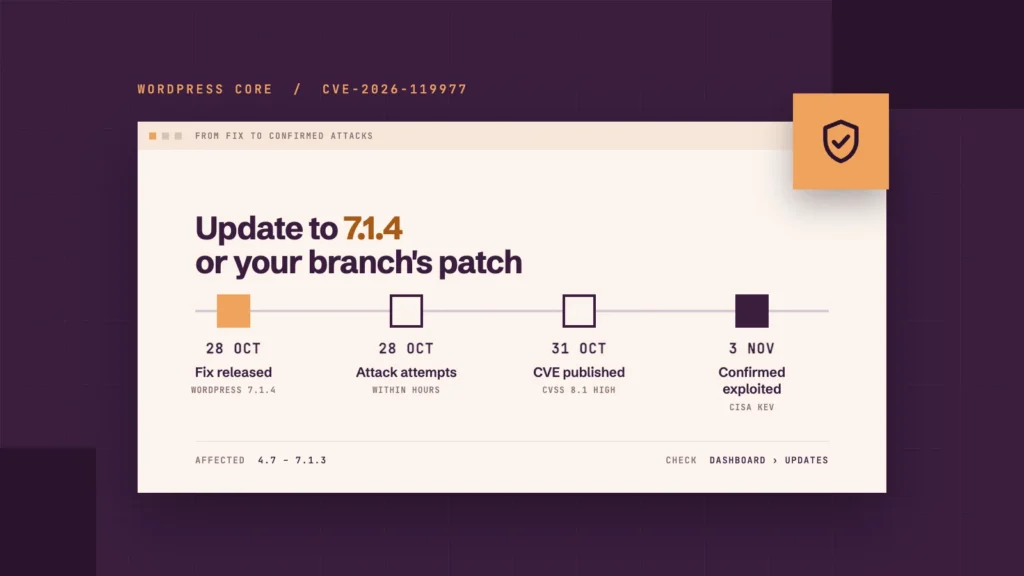
These security concerns were taken incredibly seriously. The UK's National Cyber Security Centre (NCSC) said organisations using any version of PHP are affected, and advised that anyone who couldn't patch or apply PHP's temporary mitigations should consider taking the system offline until it could be fixed. Fortunately, the PHP project brought its release forward and published fixes on 21 October: 8.5.12, 8.4.27, 8.3.36 and 8.2.35.
Attackers weren't far behind. Amazon reported an exploitation attempt on 17 October, four days before the flaws were made public, and Cloudflare's chief executive said that attempts went from thousands to millions within hours of the announcement. On 22 October, German and Dutch cyber security agencies said they hadn't yet seen confirmed successful break-ins. That has since changed: on 24 October, a security researcher recorded successful attacks on test servers set up to attract them, and on 26 October the US Cybersecurity and Infrastructure Security Agency (CISA) added both flaws to its list of vulnerabilities known to be exploited.
Is there a third PHP vulnerability?
Yes, although it's less serious. On 23 October, PHP disclosed a third flaw, CVE-2026-115560, which it describes as an unlikely route to an attack that only applies with an unusual combination of settings and code. As of 27 October, there's no patched release for it yet: a fix is due in PHP's next routine release. Until then, PHP recommends turning off a server setting called session.upload_progress.enabled, and your host can tell you whether that's been done.
What we did for the websites we host
We use more than one hosting provider. When the alert landed, our developer contacted 20i, which confirmed that the relevant security fixes had been applied across its hosting platform. That confirmation covers the sites we host with 20i, so we check with each provider separately rather than assuming one answer covers everything. The part worth copying is that our developer asked, rather than trusting the PHP version shown in a dashboard.
That dealt with October's flaws for those sites, but it doesn't change the December deadline. We'd still move any site off PHP 8.2 before the end of the year, after testing it on the newer version first, because staying on a supported version is what keeps future fixes coming and keeps your theme and plugins working properly.
Is my WordPress website affected?
If PHP on your server hasn't been patched, assume it is. The flaws are in PHP itself, so they affect any server running PHP applications, not just WordPress. The NCSC also warns against assuming only out-of-date versions are at risk.
WordPress has confirmed that no WordPress update is needed or planned. You should still keep WordPress core, themes and plugins updated, because those updates fix other problems. Just don't take a routine WordPress update as a sign that the PHP flaws have been dealt with.
What if my site runs an older version of PHP?
Then there's no official patch to wait for. PHP has already stopped issuing security fixes for 8.1, 8.0 and 7.4, although some hosts have backported October's fixes to those versions, so it's worth checking with yours. For site owners on PHP older than 8.2 who manage their own server, WordPress pointed to the advice from national cyber security agencies: consider taking the site offline while you upgrade.
If your site is with a hosting provider, it's worth having a conversation with them about upgrading you to a more recent version, if they haven't already done so. If your site is too old to upgrade without things breaking, it may be time to look at a website redesign.
Who is responsible for updating PHP on my website?
In most cases, your hosting provider. But a small business website has three layers, and they're often looked after by different people:
Layer
What it includes
Who usually looks after it
The server
What it includesOperating system, web server software, PHP
Who usually looks after itYour hosting provider
The website software
What it includesWordPress core, theme, plugins, Elementor
Who usually looks after itYou, your developer or a maintenance plan
The content
What it includesPages, posts, images, forms
Who usually looks after itYou or your team
October's flaws sat entirely in the server layer, and that's where things tend to slip through the cracks. If one company built your site, another hosts it and plugin updates only happen when someone remembers, it's easy for everyone to assume someone else is keeping an eye on the server.
Does it depend on the type of hosting I have?
Yes. On shared or managed WordPress hosting, your host usually takes care of PHP for you. GoDaddy, for example, said on 22 October that it had patched its managed services, including its web hosting and managed WordPress hosting. On a VPS, a dedicated server or a self-managed cloud server, it's usually down to you or whoever manages it for you. GoDaddy and Namecheap both told those customers they'd need to update PHP themselves.
Keeping every layer with one team is how we look after client websites. When we rebuilt the site for Redgrave Search, an executive search firm whose old site was slow, unreliable and had at one point been compromised by malware, we put hosting, maintenance and monitoring in place afterwards, so one team is responsible for keeping it secure. You can see more of our work on our results page.
How do I check which PHP version my website uses?
In WordPress:
Log in to your dashboard.
Go to Tools > Site Health > Info.
Open the Server section and find the PHP version.
Your hosting control panel usually shows it too (WordPress's Site Health guide explains the screen). Then compare it with the fixed releases:
PHP 8.5.12, 8.4.27, 8.3.36, 8.2.35 or later in the same branch: includes October's fixes.
PHP 8.2 to 8.5 with a lower number: ask your host whether the fixes have been applied, or to update it now.
PHP 8.1 or older: no longer officially supported, so an upgrade is needed. In the meantime, ask your host whether it has backported October's fixes.
Don't treat the number as the final word. Some hosts apply security fixes without changing it, as cPanel and CloudLinux both did in October. Your host is the one who can confirm.
Tips from our developer
A newer version number isn't proof you're protected. Moving to PHP 8.3 doesn't on its own mean October's fixes are in place. What matters is that your host has applied the patches.
Check your control panel, or ask. Your host can confirm in writing whether the latest security patches are on your server.
Keep the rest of WordPress updated too. PHP is only one layer. WordPress core, plugins and themes need regular updates as well.
Can't find your PHP version, or not sure what it means for your site? Book a free 30-minute call, and we'll check your current hosting and setup with you.
What should a small business do before 31 December?
You don't need to make every change yourself. The aim is to find out what's already been done, spot anything outstanding and have a plan before the end of the year.
Step 1: Check your PHP version
Use the Site Health steps above and make a note of the number, so you can compare it after any change.
Step 2: Ask your host to confirm the patches
Ask whether the fixes for CVE-2026-109618 and CVE-2026-109619 have been applied to your hosting, and whether session upload progress has been turned off for CVE-2026-115560. Get the answer in writing, with a date.
Step 3: Plan your upgrade if you're on PHP 8.2 or older
Aim for PHP 8.4 or 8.5 where your theme and plugins support them, with PHP 8.3 as the minimum, as it now only receives security fixes. Check that your theme, plugins and any custom code will work on the new version first, and test on a staging copy rather than the live site. Leave it until late December, and there's no time to fix anything that breaks. Planning an Elementor v4 upgrade too? Section 1 of our free readiness checklist covers PHP, memory and hosting.
If your site is built with Elementor, our Elementor maintenance package checks templates, forms and mobile layouts after updates, and our Elementor support package can help with anything that doesn't work after the move.
Step 4: Check your backups and the things you rely on
Make sure a recent backup exists and that someone knows how to restore it. After any change, test the parts of the site that bring in work, such as contact forms, booking enquiries and payments. If a page looks different afterwards, you may be seeing an old saved copy, and our guide to why your website might look different after an update explains how to check.
Step 5: Agree who's responsible
Write down who handles server security, WordPress updates, PHP upgrades and testing. If the answer to any of those is "not sure", that's the gap to close first.
What should your website support cover?
Plenty of small businesses already hand this work to someone else. The government's Cyber Security Breaches Survey 2025/26 found 44% of micro businesses have an external cyber security provider, up from 39% the year before. October's release is a good test of whether that arrangement covers the server, because a plan that only updates plugins wouldn't have fixed it. When you compare options, ask:
Who updates PHP and the server, and how quickly after a critical release?
Who keeps track of PHP support dates and plans the upgrade before one passes?
How often is the site backed up, and how fast can it be restored?
Does someone test the site after updates go in?
Who tells you when an alert like October's lands?
Our Hosting plan, at £15 a month plus VAT, includes firewalls, SSL, security monitoring, daily backups and uptime monitoring in UK data centres. Hosting & Maintenance, at £55 a month plus VAT, adds monthly WordPress, plugin and theme updates, front-end testing after updates, technical support and minor bug fixes. We look after WordPress sites whether or not we built them.
Our monthly maintenance checks also include a review of each site's PHP version, so an upgrade can be planned and tested before a version reaches end of life, rather than switched without checking.
We won't claim any of this makes a website immune to the next flaw, and maintenance doesn't replace your host's job of patching the server. What it does mean is that someone is already responsible when a flaw lands, and you hear about it from them rather than from the news.
Conclusion: make sure someone owns your whole website
October was the easy version. A fix arrived within a day of the news breaking, and on well-run hosting it was applied without the owner doing anything. The 31 December deadline is the harder one, because from 1 January 2027 a flaw like October's would leave PHP 8.2 sites with no official fix at all.
You don't need to wait for the next security alert to find out who looks after your website. Not sure which PHP version your site runs on, or who updates it? Book a free 30-minute call about your website, and we'll tell you where we'd start.
Frequently asked questions
Does updating WordPress fix the October 2026 PHP vulnerabilities?
No. The flaws are in PHP, which runs on your server, so WordPress has no update for them. Keep WordPress, themes and plugins updated for other reasons, and ask your host to confirm the PHP patches separately.
How do I know if my website has been patched?
Ask your hosting provider whether the fixes for CVE-2026-109618 and CVE-2026-109619 have been applied to your hosting. Don't rely on the version number alone, because some hosts apply fixes without changing it.
What happens if my website still uses PHP 8.2 after 31 December 2026?
Nothing visible on the day. Your site keeps working, but any flaw found after that date won't get an official fix for 8.2. Some hosts will move you to a newer version automatically, which can break untested plugins.
Can I upgrade PHP myself?
Often, yes. Many hosting control panels let you choose your PHP version. The risk is what happens next: themes, plugins or custom code may not work on the newer version, so back up first and test on a staging copy before changing a live site.
Does this affect our Cyber Essentials certification?
It can. Cyber Essentials requires updates rated critical or high risk by the vendor (or with a CVSS v3 score of 7 or more) to be applied within 14 days of release, and internet-facing servers and cloud services are in scope. Software that no longer receives security updates must be removed or cut off from the internet, so check whether your host still provides fixes for older PHP versions. If your website is in scope, ask your host for the date PHP was patched and keep a record.
Can Nivo look after a WordPress site it didn't build?
Yes. We host and maintain WordPress sites whether or not we built them, with monthly updates, testing after updates, daily backups and technical support on our Hosting & Maintenance plan.